This chapter contains the following topics:
Use this program to update Low Level Codes in Item Master records for all items, or selectively for those component items affected by bill of material maintenance since this program was last run.
When Product Structure records are added or deleted in Enter Product Structures, the component Item Numbers in those structure records are automatically added to Low Level Codes Updates. When you run the selective update option of this program, the Low Level Codes are recalculated for component Item Numbers in the Low Level Codes Update. After selective or comprehensive Low Level Code update processing is completed, the Low Level Codes Updates are automatically cleared.
Low Level Codes must be updated by this program before you are allowed to run Update Total Costs - All Items in Product Definition & Costing, or before you are allowed to perform a multiple level material requirements explosion in Master Scheduling & MRP. Those programs use Low Level Codes and will not allow you to complete their processing functions if the Low Level Codes Updates have not been cleared.
It is not necessary to do a full file update of item Low Level Codes unless you have created Product Structures by importing a bill of material file from another source, or your Low Level Codes Updates data has been damaged. The selective update method will normally be much faster, since it only updates those item records affected by recent Product Structure entries.
Select
Update low level codes from the P/D menu.
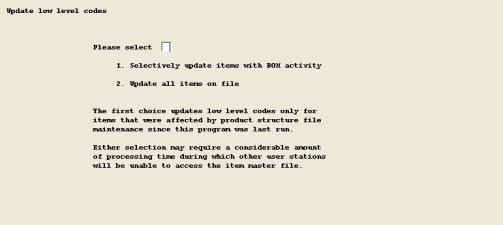
The following screen displays:
Enter the information as follows:
Please select __
1. Selectively update items with BOM activity
2. Update all items on file
The first choice updates low level codes only for items that were affected by product structure file maintenance since this program was last run.
Either selection may require a considerable amount of processing time during which other user stations will be unable to access the Item Master File.
Enter your choice. If you enter a selection, the program asks you if it is "OK to proceed with update ?". Answer Y to start the processing or N to exit the program.
This program also checks for product structure exception conditions, such as "Item structured as component of itself at a lower level in bill". Exception messages with related Item Numbers, if any, are automatically printed after Low Level Code updating is completed. Use the Product Structure entry program to correct any exceptions listed, and then rerun this function.
A message informs you when processing is completed.